Setting fees and instalments
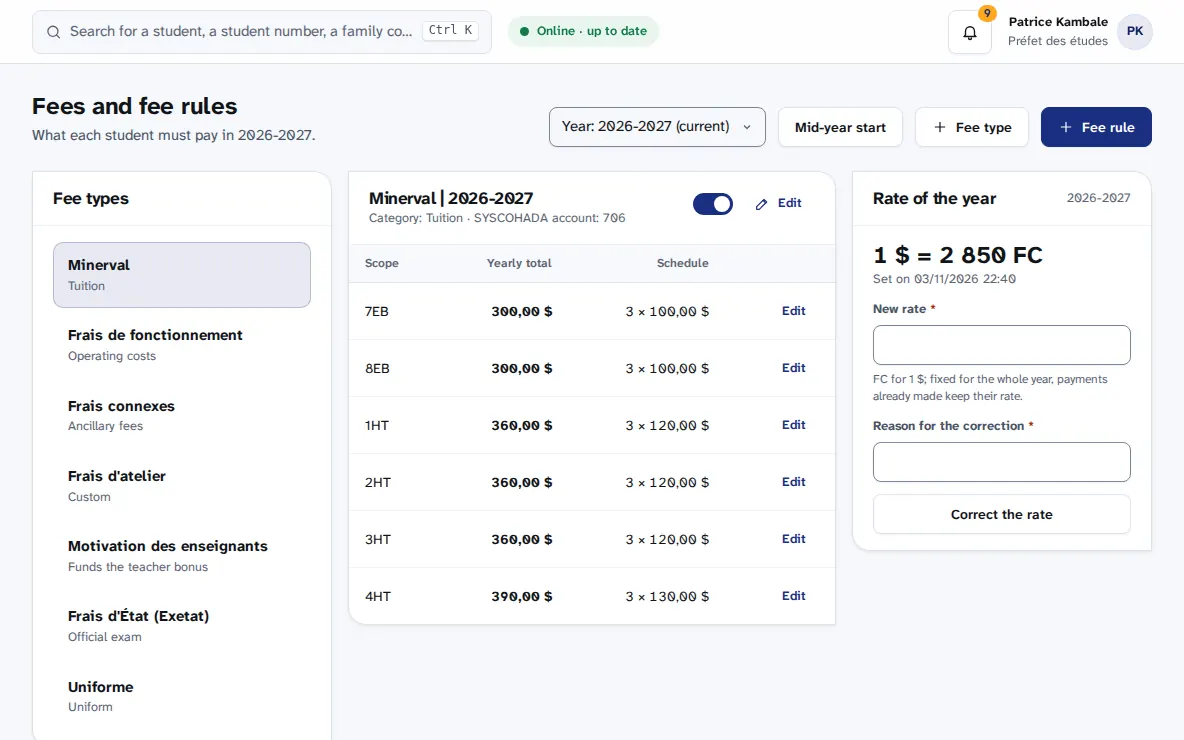
Set each fee's amount, currency and instalments, and the year's exchange rate.
Steps
- Open Fees.
- Add a fee (tuition, registration…) and a scale: amount, currency, levels concerned.
- Choose the schedule: one payment or instalments with their dates.
- Record the year's exchange rate (dollars and francs).
Frequently asked questions
A discount for one student? In their record, finances tab, Grant a discount.
The rate changes during the year? It can be corrected; each payment keeps the rate of the day it was received.
The school started with Mwangaza after the beginning of the year? In Fees and fee rules, Mid-year start: download the Excel template (your students and what they still owe), write what each had already paid, then send it. These payments lower what the student owes, without going through the cash desk or giving a receipt; a file sent twice never counts anything twice. In a demonstration space, Filled example gives a file ready to try.
Related articles
Updated on 4 November 2026. In the app, the “Help” button at the top of each screen opens its article.