Following unpaid fees
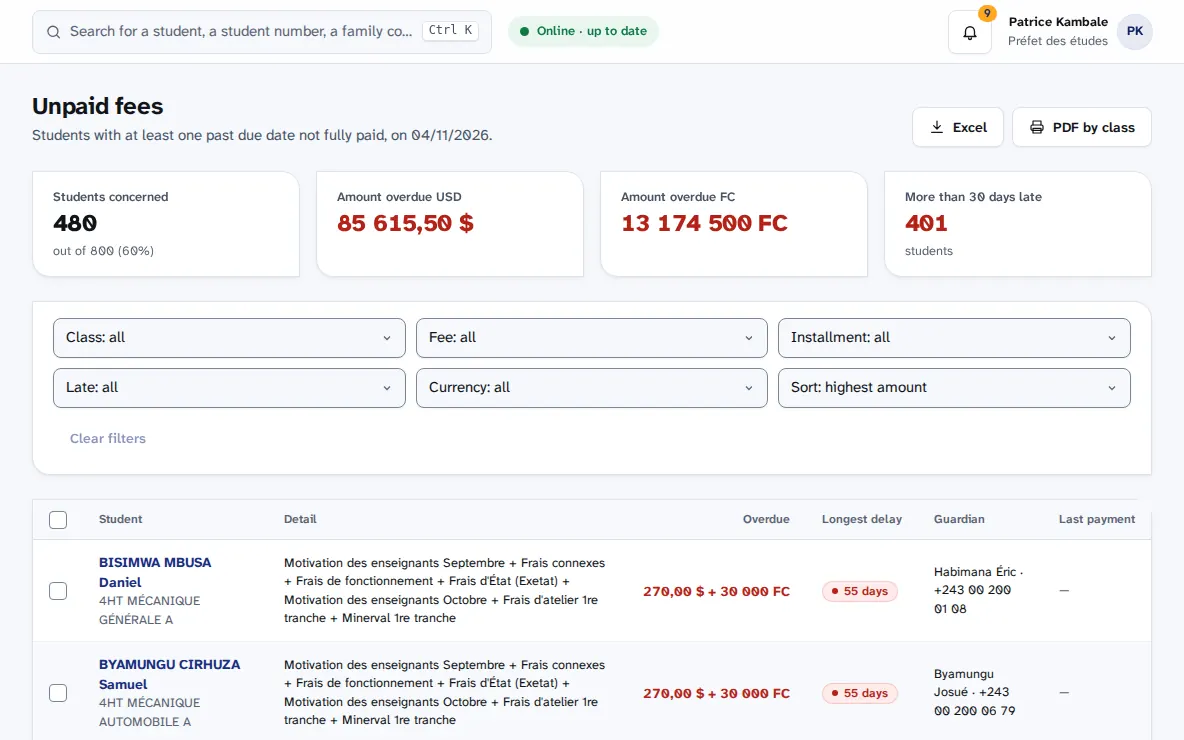
See who owes how much, remind families and export the list.
AccountantHead of schoolPromoter
Steps
- Open Unpaid.
- Filter by class, instalment or amount due.
- Open a student to see their instalments and payments.
- Print the statements or export the list to Excel.
- Exclusion (button at the top of the page): pick the instalment and the date, check how many students are concerned, then announce it. Parents with the portal are told once; print the door list and the notes. A student who pays leaves the list by itself.
Good to know. Late students' parents can be summoned from Summonses.
Frequently asked questions
Which currency are amounts in? Each debt stays in the fee's currency; the total is converted at the year's rate.
Related articles
Updated on 12 November 2026. In the app, the “Help” button at the top of each screen opens its article.